
Building your own Artificial Pancreas,
we guide you through the journey.
Open-source DIY APS is powerful, but it requires complex setup and learning that patients must handle themselves.
The contents of this page are for reference purposes only and cannot substitute for medical diagnosis or treatment.
How does an Artificial Pancreas System (APS) work?
An artificial pancreas is a system that uses technology to replace the role of a stopped pancreas. The core lies in a Closed-loop structure where 'Measure (Sensor) - Decide (App) - Inject (Pump)' continuously circulates.
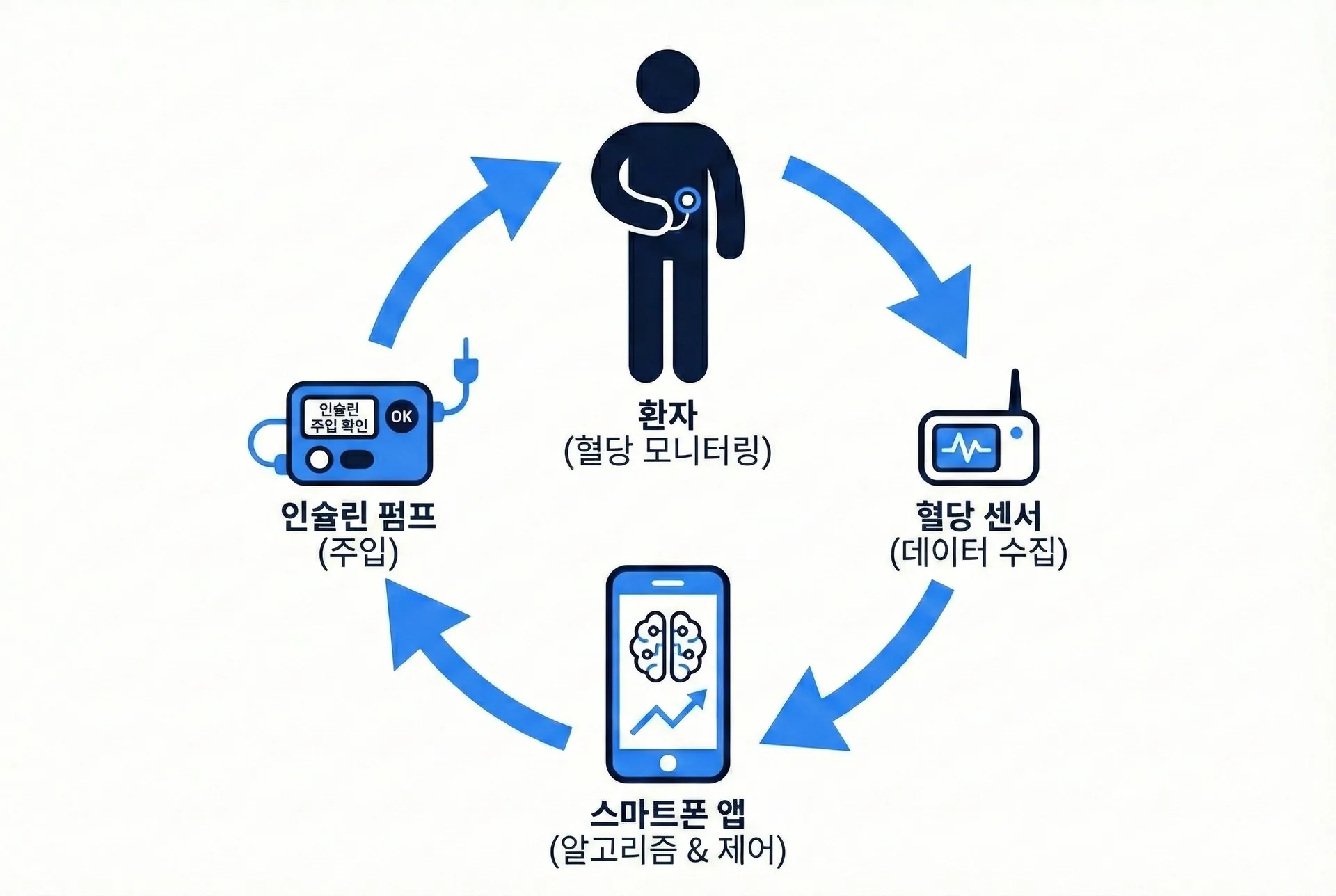
Hardware Preparation
Connecting just any device won't work. First, check the 'Golden Standard' combinations verified by the global community.
Recommended Combination for Beginners (Golden Standard)
Galaxy S Series (Smartphone) + Dana-i (Pump) + Dexcom G6 (Sensor)
This is the cleanest combination connecting via Bluetooth without additional communication equipment.
1. Android Phone
Brain of the System (Master)
iPhones (iOS) cannot use AndroidAPS due to background app execution restrictions.
Required Specs Checklist
- OS: Android 9.0 (Pie) or higher
- Model: Samsung Galaxy S series recommended
- Warning: 'Android Go' editions are not supported
2. Insulin Pump
Execution Organ (Actor)
Receives commands from the smartphone to inject insulin. Bluetooth support is key.
Supported Models
- Dana-i / Dana-RS (Recommended)
Direct Bluetooth connection to phone - Medtronic / Combo
Communication bridge like 'RileyLink' is required
3. Continuous Glucose Monitor
Detection Sensor (Sensor)
Transmits glucose values to the phone every 5 minutes. Developer app setup may be required instead of the official app.
Supported Models
- Dexcom G6 / G7: Most stable
- Libre 1, 2: Requires a separate transmitter
- Note: Installing xDrip+ app is recommended
For more detailed compatibility information, please check the AndroidAPS Official Documentation.
Building the App
This is the highest barrier to entry. Due to regulations, you cannot download it from the App Store. Patients must become 'developers' and build an app tailored to their phones.
- 01
Prepare Materials
Copy (Fork) the source code (AndroidAPS) shared by global developers to your Github account.
- 02
Set up Tools
Just as cooking requires a kitchen, install Android Studio, a professional development program, on your PC.
- 03
Build the App
Open the imported code in Android Studio and click the 'Generate Signed APK' button to create the app file (.apk).
- 04
Install on Phone
Transfer the completed app file to your smartphone via USB and install it to finally see the icon.
Reality Check: Due to PC specs or Java version errors, it takes an average of 3 days to 1 week for a non-major to complete this process alone.
Tuning & Safety Settings
The app won't work perfectly right after installation. For safety, you must pass a verification process similar to a 'driving test'.
1. Step-by-step Unlocking (Objectives)
For user safety, the artificial pancreas has its automated injection features locked initially. You must solve 11 stages of quizzes and prove your actual pump operation ability to unlock the next stage.
- Lv. 1Simple Monitoring
- Lv. 4Open Loop
(Suggestions only) - Lv. 6~Closed Loop Starts!
(Auto Injection)
Time required: It takes at least 1-2 weeks to enter Auto mode.
2. Input Your Body's Data
The AI needs reference values to make decisions. It needs values at the same level as those used at the hospital.
- DIA (Duration of Insulin Action)
- How many hours insulin remains active in your body (usually 5-6 hours)
- ISF (Insulin Sensitivity Factor)
- How much 1 unit of insulin lowers blood glucose
- IC (Insulin to Carb Ratio)
- How many units of insulin are needed per 10g of carbs
3. Safety Limit Settings
Physical limits must be set to prevent device malfunction or excessive injection.
- Max Bolus: Limit the maximum amount of insulin injected at once
- Max Carb: Limit the maximum amount of carbs that can be logged
- Hypo Alert: Must set alarms to wake you up if hypoglycemia occurs during sleep
Principles of the Algorithm
How does the machine decide the insulin amount? The key lies not in the present, but in 'predicting future glucose'.
IOB (Insulin On Board)
"Insulin still active in the body"
It calculates the residual amount already injected but not yet effective to prevent over-injection (hypoglycemia).
COB (Carbs On Board)
"Food not yet digested"
It calculates how much material is left in the stomach that will raise glucose, preparing insulin in advance.
Oref1 Algorithm Decision Process
"Current glucose is fine, but due to high COB (remaining food), glucose is predicted to spike in 30 minutes."
→ Command: Increase insulin delivery rate by 150%
Limitations of the Existing Algorithm
The DIY approach (Rule-based) relies solely on the formulas (ISF, IC) pre-entered by the user. If variables not in the formula arise—such as 'menstrual cycle, stress, poor condition'—the prediction can be wrong. Which is also why filling in the carbohydrate input well matters so much.
References
- AndroidAPS documentation — Super Micro Bolus (SMB): androidaps.readthedocs.io
- Enabling oref1 — AndroidAPS Objective 9: androidaps.readthedocs.io
The algorithm notes on this page summarize the public documentation of the open-source project above. They describe an algorithm GlucoUs did not develop.
Koreans use the
'SMB Algorithm'
Because in a 'rice-based culture' with a high proportion of carbs, the traditional basal adjustment (AMA) method cannot control glucose spikes.
What is SMB (Super Micro Bolus)?
Traditional Method (AMA)
Like opening a faucet a bit more, it gradually increases the 'basal rate'.
→ Slow response time
SMB Method
Like firing a machine gun, it delivers 'super micro boluses' rapidly.
→ Instantly suppresses sharp spikes
* This technology, based on the Oref1 library, is essential for high-carb Korean diets.
However, SMB is a 'Double-Edged Sword'
If the settings aren't perfect, there's a high risk of hypoglycemia. That is why GlucoUs treats this as a research problem. The "Planned" column below describes research that is not in the app yet.
| Category | Existing DIY (SMB) | GlucoUs · Today | GlucoUs · Planned |
|---|---|---|---|
| Operating Principle | Rule-based "If glucose is X, blindly inject Y" | Does not calculate insulin A wellness app for logging meals and nutrition | RL-based (Reinforcement Learning) research planned Learning from experience that "Y fits this situation" |
| Core Issue | Relies on user-input values (ISF) If input is wrong, calculation is wrong | Not applicable There is no insulin feature | Planned research on an algorithm that learns changes in your body |
| Meal Logging | Manual input (Scale required) | Take a photo and the carbs are calculated and logged Portions are set against your own hand · for reference | Researching automatic food-volume estimation from photos |
Two problems
GlucoUs is working on
Two of the most hands-on parts of living with diabetes are logging how much you eat and fine-tuning insulin. Today the app helps with the first kind of logging; the rest is planned research.
Today · in the app
1. Log a meal with one photo
Take a photo and the carbs are calculated and logged, with portions set against your own hand. You can log a meal even without a scale.
Planned We are researching vision AI that estimates food volume from a photo automatically.
Planned · research stage
2. Next-gen insulin therapy
"An algorithm that learns your body."
We plan to research how a reinforcement learning (RL) model could learn an individual's response patterns to support an insulin delivery algorithm. The app does not calculate insulin today.
Related research topics
Insulin resistance prediction
Reinforcement learning-based glucose response modeling
GlucoUs's plan towards
a fully artificial pancreas
Items marked "Planned" have not happened yet and may change with research and regulatory progress. Today GlucoUs is a wellness app for logging meals and nutrition, not a medical device.
2025
Foundation · done
- Took part in filing artificial pancreas–related patents
- MVP algorithm design
2026
Validation · now
- Done Launched the meal-logging app
- Planned Preparing the official launch of a diabetes awareness simulator
- Planned We plan to collect clinical data for the artificial pancreas algorithm
2027
Expansion · planned
- We plan to prepare for SaMD (Software as a Medical Device) clearance
- We plan to explore the global market (North America)
2028~
Completion · planned
- Research aimed at commercializing a fully automated on-device AI artificial pancreas
Does it feel too complicated?
We know the moment the joy of eating becomes a chore. With GlucoUs, there is no complex counting. Just one camera shot gives you a carbohydrate estimate for reference.